Huawei SUN2000 Communication Faults – Causes, Diagnosis & Solutions
What Are Communication Faults on Huawei SUN2000 Inverters?
Huawei SUN2000 inverters rely on communication between the inverter, Smart Dongle, SmartLogger, FusionSolar platform, and other connected devices.
When communication is interrupted, monitoring data may stop updating, devices may appear offline, or alarms may be generated.
Communication faults usually do not stop energy production, but they can affect monitoring, remote management, and plant diagnostics.
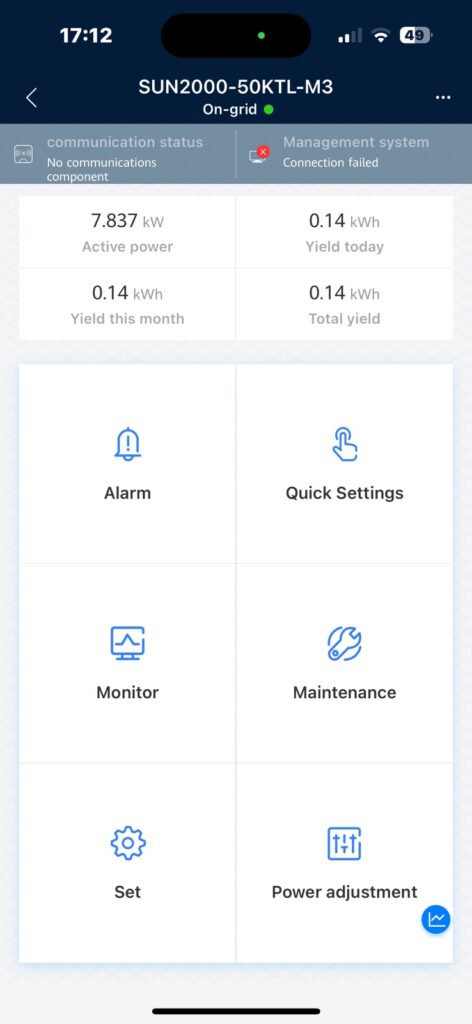
Common Symptoms
- Inverter appears offline in FusionSolar
- No recent production data
- Smart Dongle disconnected
- Communication alarm displayed
- Plant status unavailable
- Delayed or missing data uploads
Main Causes
1. Internet Connectivity Problems
- Router offline
- ISP outage
- Unstable mobile network
- Firewall restrictions
2. Smart Dongle Issues
- Dongle firmware problems
- SIM card issues (4G models)
- Poor signal strength
- Incorrect APN settings
3. RS485 Communication Problems
- Incorrect wiring
- Reversed A/B terminals
- Loose connections
- Excessive cable length
4. SmartLogger Configuration Errors
- Incorrect device addresses
- Communication conflicts
- Network configuration issues
5. FusionSolar Server Connection Issues
- Temporary server maintenance
- DNS resolution problems
- SSL or certificate issues
How to Diagnose Communication Problems
Step 1 – Check Local Inverter Access
Can you connect directly to the inverter via WLAN?
If yes:
- inverter is operational
- issue may be external
Step 2 – Verify Internet Connection
Check:
- router status
- mobile signal strength
- gateway connectivity
Step 3 – Inspect Dongle Status
Verify:
- LEDs
- signal level
- online status
Step 4 – Review FusionSolar Logs
Look for:
- communication interruption
- reconnect attempts
- device offline events
Communication Architecture of Huawei Systems
SUN2000
↓
Smart Dongle
↓
Internet
↓
FusionSolar Cloud
Communication Devices Used in Huawei Systems
Smart Dongle WLAN-FE
- Wi-Fi
- Ethernet
Smart Dongle 4G
- SIM card
- Mobile network
SmartLogger
- Commercial and utility-scale systems
- Multiple inverter management
Typical Communication Indicators
SUN2000 – Running
Smart Dongle – Online
FusionSolar – Updating data
SmartLogger – Connected
Smart Dongle LED Indicators
The Smart Dongle LEDs provide useful information about communication status.
Common indications include:
- Solid green: Connected and operating normally
- Flashing green: Communication in progress
- Red indicator: Communication or network issue
- No LED activity: Power or hardware problem
Always consult the specific Smart Dongle manual for exact LED meanings.
RS485 Communication Best Practices
When using RS485 communication:
- Maintain correct A/B polarity
- Use shielded twisted-pair cable
- Avoid routing communication cables alongside power cables
- Terminate the communication bus according to Huawei guidelines
- Verify device addresses are unique
Improper RS485 installation is a common cause of intermittent communication issues.
Best Practices
- Use shielded RS485 cable
- Avoid long communication runs
- Keep firmware updated
- Monitor signal quality
- Verify network stability
Why Is My Huawei Inverter Offline but Still Producing Power?
One of the most common misconceptions is that an offline inverter has stopped generating electricity.
In many cases, the inverter continues producing power normally while only the communication path to FusionSolar is interrupted.
This typically occurs when:
- the internet connection is unavailable
- the Smart Dongle loses connectivity
- the FusionSolar platform cannot be reached
Always verify local inverter operation before assuming a production issue.
FAQ
Why is my Huawei inverter offline but still producing power?
The inverter may continue generating electricity even when communication with FusionSolar is lost.
Can communication faults stop energy production?
Usually no. Most communication faults affect monitoring rather than generation.
How do I reconnect a Huawei Smart Dongle?
Check power, network settings, signal strength, and firmware version.
How often should FusionSolar update data?
Typically every few minutes, depending on communication method and system configuration.
Conclusion
Communication faults in Huawei SUN2000 systems are usually related to internet connectivity, Smart Dongle configuration, RS485 wiring, or FusionSolar communication issues.
In most cases, these problems affect monitoring rather than power generation. A structured diagnostic approach that starts with local inverter access and progresses through the communication chain can quickly identify the root cause and restore reliable monitoring.
9 Comments