Huawei SUN2000 Settings Explained – Complete Menu and Configuration Guide
Introduction
Huawei SUN2000 inverters provide a wide range of configuration options for system monitoring, grid compliance, communication, power control, battery integration, and diagnostics.
Understanding the available menus and settings is essential for commissioning engineers, service technicians, and maintenance personnel. Incorrect configuration can lead to communication failures, production limitations, grid compliance issues, or unnecessary alarms.
This guide explains the most important Huawei SUN2000 menus, connection methods, configuration settings, and common troubleshooting considerations.
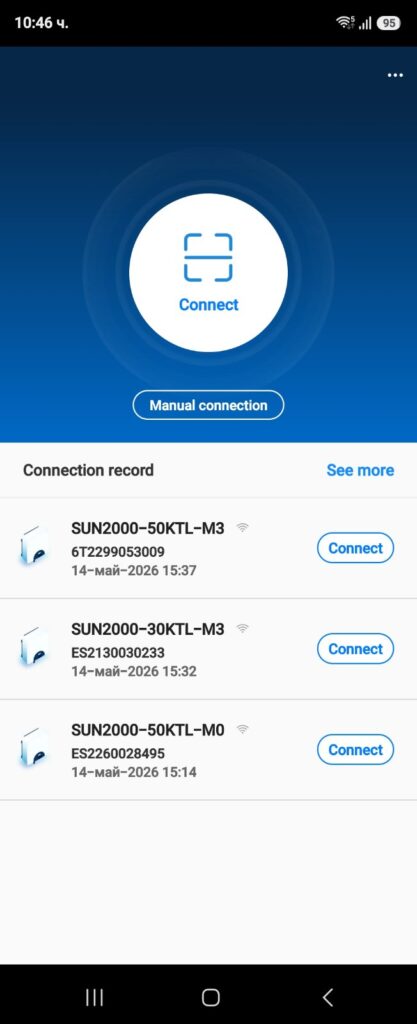
Access Levels
Huawei SUN2000 provides several access levels depending on the user role.
User
The User level provides access to basic monitoring information such as:
- Current power output
- Daily energy production
- Total energy production
- Alarm information
- Device status
Most configuration settings are not accessible at this level.
Installer
Installer access provides additional configuration capabilities including:
- Grid settings
- Communication configuration
- Power control
- Optimizer management
- Battery integration settings
This level is typically used during commissioning and troubleshooting.
Advanced Settings
Some parameters require higher authorization because incorrect changes may affect system safety or grid compliance.
Only qualified personnel should modify advanced settings.
Connection Methods
Huawei SUN2000 inverters can be accessed through several communication methods depending on the installation type and available hardware.
Understanding the available connection options is important during commissioning, troubleshooting, firmware upgrades, and system maintenance.
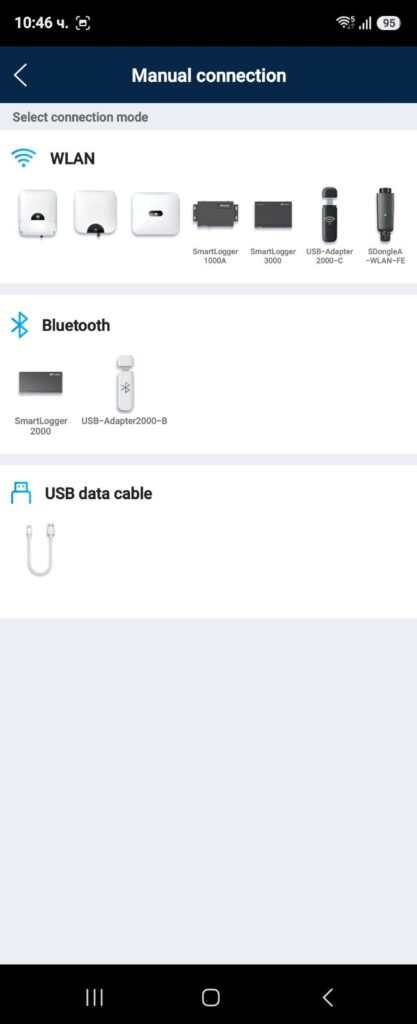
Local WLAN Connection
Most Huawei SUN2000 inverters support local wireless access through the built-in WLAN hotspot or a connected Smart Dongle.
The technician can connect directly using:
- FusionSolar App
- SUN2000 App (older systems)
Typical uses include:
- Initial commissioning
- Parameter configuration
- Local troubleshooting
- Firmware upgrades
Advantages:
- No internet connection required
- Full access to local settings
- Fast diagnostics
Limitations:
- Physical presence on site required
- Limited wireless range
Smart Dongle WLAN-FE
The Huawei Smart Dongle WLAN-FE provides:
- Wi-Fi communication
- Ethernet communication
- FusionSolar cloud connectivity
This is one of the most common communication solutions used in residential and commercial PV systems.
The Smart Dongle allows:
- Remote monitoring
- Alarm reporting
- Firmware updates
- Remote diagnostics
Smart Dongle 4G
For sites without reliable internet access, Huawei offers Smart Dongle 4G communication.
Features include:
- Mobile network connectivity
- Remote monitoring
- Cloud communication
- Reduced dependence on local network infrastructure
Common applications:
- Utility-scale solar plants
- Remote installations
- Agricultural PV systems
Ethernet Connection
Many SUN2000 models support direct Ethernet communication.
Typical uses include:
- Local network integration
- SCADA communication
- EMS integration
- SmartLogger communication
Important network parameters include:
- IP Address
- Subnet Mask
- Gateway
- DNS Server
Incorrect network settings are a common cause of communication failures.
SmartLogger Connection
Large commercial and utility-scale systems often use Huawei SmartLogger devices.
The SmartLogger acts as a central communication controller between:
- Multiple inverters
- Power meters
- Battery systems
- SCADA systems
- FusionSolar
Benefits include:
- Centralized monitoring
- Easier plant management
- Advanced control functions
Smart Logger vs Smart Dongle: Which One Does Your Solar System Need?
Modbus TCP Communication
Modbus TCP is commonly used for third-party integration.
Typical applications:
- EMS Controllers
- SCADA Platforms
- Building Management Systems (BMS)
- Energy Monitoring Systems
This communication method provides access to:
- Measurements
- Alarms
- Operating status
- Control commands
RS485 Communication
RS485 remains one of the most widely used industrial communication interfaces in solar installations.
Typical connected devices include:
- SmartLogger
- Power Sensors
- Battery Systems
- Third-party Controllers
Common troubleshooting points:
- Incorrect polarity
- Wrong device address
- Communication parameter mismatch
- Cable termination issues
FusionSolar Remote Access
When internet communication is operational, technicians can access inverter information remotely through FusionSolar.
Available functions include:
- Monitoring
- Alarm review
- Historical data analysis
- Remote diagnostics
However, certain critical parameters may still require local installer access.
Device Information Menu
The Device Information section contains general inverter information.
Device Model
Displays the inverter model.
Examples:
- SUN2000-50KTL-M3
- SUN2000-100KTL-M2
- SUN2000-215KTL-H3
Serial Number
Unique device identification used for:
- Warranty claims
- Technical support
- Asset management
Firmware Version
Displays current firmware versions installed in:
- Inverter controller
- Communication modules
- Power modules
Firmware compatibility should always be verified during troubleshooting.
Running Status
Shows inverter operating condition:
- Running
- Standby
- Shutdown
- Fault
- Grid Connected
Protection Parameters Menu
Typical parameters include:
– Insulation Resistance Protection
– Residual Current Detection (RCD)
– Anti-Islanding Protection
– Overvoltage Protection
– Undervoltage Protection
– Frequency Protection
These settings are usually controlled by the selected grid code and should only be modified by authorized personnel.
Feature Parameters Menu
MPPT Multi-Peak Scanning
– Power Factor Control
– Power Limitation
– LVRT (Low Voltage Ride Through)
– Anti-Islanding Functions
– String Monitoring
These settings are commonly adjusted in commercial and utility-scale installations.
Smart Meter Menu
Huawei inverters often communicate with smart meters for:
– Export limitation
– Consumption monitoring
– Self-consumption optimization
– Battery control
Typical checks include:
– RS485 communication
– Meter address
– Import/Export direction
– Real-time power measurement
Monitoring Menu
This section provides real-time electrical measurements.
PV Voltage
Displays string DC voltage.
Abnormal values may indicate:
- Open strings
- Disconnected connectors
- String faults
PV Current
Displays current produced by each MPPT.
Low current may indicate:
- Shading
- Module faults
- String mismatch
Grid Voltage
Displays AC voltage measured at the inverter output.
Useful when investigating:
Grid Frequency
Shows utility frequency.
Common values:
- 50 Hz
- 60 Hz
Active Power
Actual power delivered to the grid.
Reactive Power
Reactive power compensation currently provided by the inverter.
Daily Yield
Displays current day energy production.
Total Yield
Displays total lifetime production of the inverter.
Grid Settings Menu
This is one of the most important configuration sections.
Grid Code
Defines local utility requirements.
Examples:
- EN50549
- VDE-AR-N 4105
- AS4777
- Country-specific utility profiles
Incorrect grid code selection can generate repeated grid alarms.
Voltage Protection Limits
Parameters include:
- Overvoltage threshold
- Undervoltage threshold
- Reconnection limits
Frequency Protection Limits
Defines acceptable operating frequency range.
Reconnection Time
Specifies how long the inverter waits before reconnecting after a grid disturbance
Communication Settings
Communication settings are frequently involved in service calls.
Ethernet Configuration
Includes:
- IP Address
- Subnet Mask
- Gateway
- DNS Server
Incorrect network settings often cause FusionSolar communication failures.
Smart Dongle Settings
Available options include:
- WLAN configuration
- Mobile network settings
- Connection status
- Signal strength
RS485 Configuration
Important parameters:
- Baud Rate
- Device Address
- Protocol Selection
Incorrect configuration can prevent communication with SmartLogger, EMS systems, and meters.
Modbus TCP
Typical settings:
- TCP Port
- Modbus Address
- Enable/Disable Function
Optimizer Management Menu
Available in systems equipped with Huawei Smart PV Optimizers.
Optimizer Detection
Searches for connected optimizers.
Typically required after:
- Optimizer replacement
- Module replacement
- New installation
Optimizer Status
Displays:
- Online optimizers
- Offline optimizers
- Communication quality
Optimizer Alarms
Common alarms include:
- Optimizer Offline
- Communication Failure
- Optimizer Detection Failed
Power Control Menu
Used to control inverter power output.
Active Power Limitation
Allows intentional reduction of inverter output.
Common applications:
- Grid export limitation
- Utility requirements
- EMS control
Export Limitation
Prevents power export above a defined threshold.
Often used together with Smart Power Sensors.
Reactive Power Control
Modes may include:
- Fixed Power Factor
- Q(U)
- Q(P)
- Cos Phi Control
Ramp Rate Control
Defines how quickly inverter power can increase or decrease.
Battery Settings
Available on compatible hybrid systems.
Battery Status
Displays:
- State of Charge (SOC)
- Voltage
- Current
- Temperature
Charge Settings
Includes:
- Maximum charge power
- Charge schedules
- Charge limits
Discharge Settings
Includes:
- Maximum discharge power
- Minimum SOC
- Backup reserve capacity
Battery Communication
Allows communication monitoring between:
- Inverter
- Battery
- EMS Controller
Alarm Menu
The Alarm section is one of the most important troubleshooting tools.
Grid Alarms
Examples:
- Grid Overvoltage
- Grid Undervoltage
- Frequency Abnormal
Communication Alarms
Examples:
- Inverter Offline
- Smart Dongle Fault
- Communication Failure
Hardware Alarms
Examples:
- Internal Fault
- Fan Failure
- Arc Fault Detection
Event Logs
Event logs provide historical records of inverter operation.
Alarm Records
Stores historical alarms.
Operation Records
Stores important operating events.
Communication Events
Records communication interruptions and recovery events.
Event logs often reveal exactly when a fault first occurred.
Maintenance Menu
Provides service-related functions.
Device Restart
Allows controlled inverter restart.
Factory Reset
Restores default settings.
Should only be used when necessary.
Firmware Upgrade
Allows installation of approved firmware packages.
Always verify compatibility before upgrading.
Common Configuration Mistakes
The following mistakes are frequently encountered in the field.
Incorrect Grid Code
Can cause repeated grid protection trips.
Wrong RS485 Address
May prevent communication with:
- SmartLogger
- Power meters
- EMS systems
Incorrect IP Settings
Can cause FusionSolar Offline alarms.
Missing Optimizer Detection
New optimizers may not appear until a detection procedure is performed.
Export Limitation Misconfiguration
May unnecessarily reduce plant production.
Incorrect DNS Settings
Can prevent successful communication with FusionSolar servers even when internet access appears functional.
Time Synchronization Issues
Incorrect date and time settings may affect event logs and troubleshooting activities.
Recommended Commissioning Checklist
Before leaving the site verify:
- Correct grid code selected
- Time and date synchronized
- Communication operational
- FusionSolar connected
- Optimizers detected
- Battery communication verified
- Alarm log checked
- Firmware versions documented
- Export limitation tested
- Meter communication verified
Conclusion
Huawei SUN2000 inverters provide extensive monitoring and configuration capabilities through their menu system. Understanding the purpose of each menu allows technicians to commission systems correctly, troubleshoot faults efficiently, and maintain reliable long-term operation.
Regular verification of communication settings, grid parameters, optimizer status, alarm logs, firmware compatibility, and battery communication can prevent many of the most common service issues encountered in photovoltaic installations.
A thorough understanding of the SUN2000 menu structure significantly reduces troubleshooting time and improves long-term system reliability.
Frequently Asked Questions
How do I access Huawei SUN2000 settings?
Huawei SUN2000 settings can be accessed locally through the FusionSolar App, Smart Dongle WLAN connection, or directly through supported communication interfaces.
What is the installer password for Huawei SUN2000?
Installer access is required for advanced configuration tasks such as communication setup, grid code selection, and optimizer management.
Can incorrect settings affect inverter performance?
Yes. Incorrect grid parameters, communication settings, or export limitation settings can reduce production or generate alarms.
Where can I find communication settings in SUN2000?
Communication settings are available under the Communication Configuration menu and include Ethernet, Smart Dongle, RS485, and Modbus TCP options.
What should I check before changing inverter settings?
Always document existing parameters, verify firmware compatibility, and ensure compliance with local grid regulations.