🔥Solar Panel Hot Spots: Causes, Symptoms, Risks and Fire Prevention Guide
Solar panels are designed to operate reliably for 25 years or more. However, cell defects, shading, installation issues, and aging can sometimes create localized overheating known as hot spots.
A hot spot is one of the most common causes of accelerated solar panel degradation and, in severe cases, may lead to permanent module damage or even fire hazards.
Understanding how hot spots develop, how to identify them, and how to prevent them is essential for maintaining long-term PV system performance and safety.
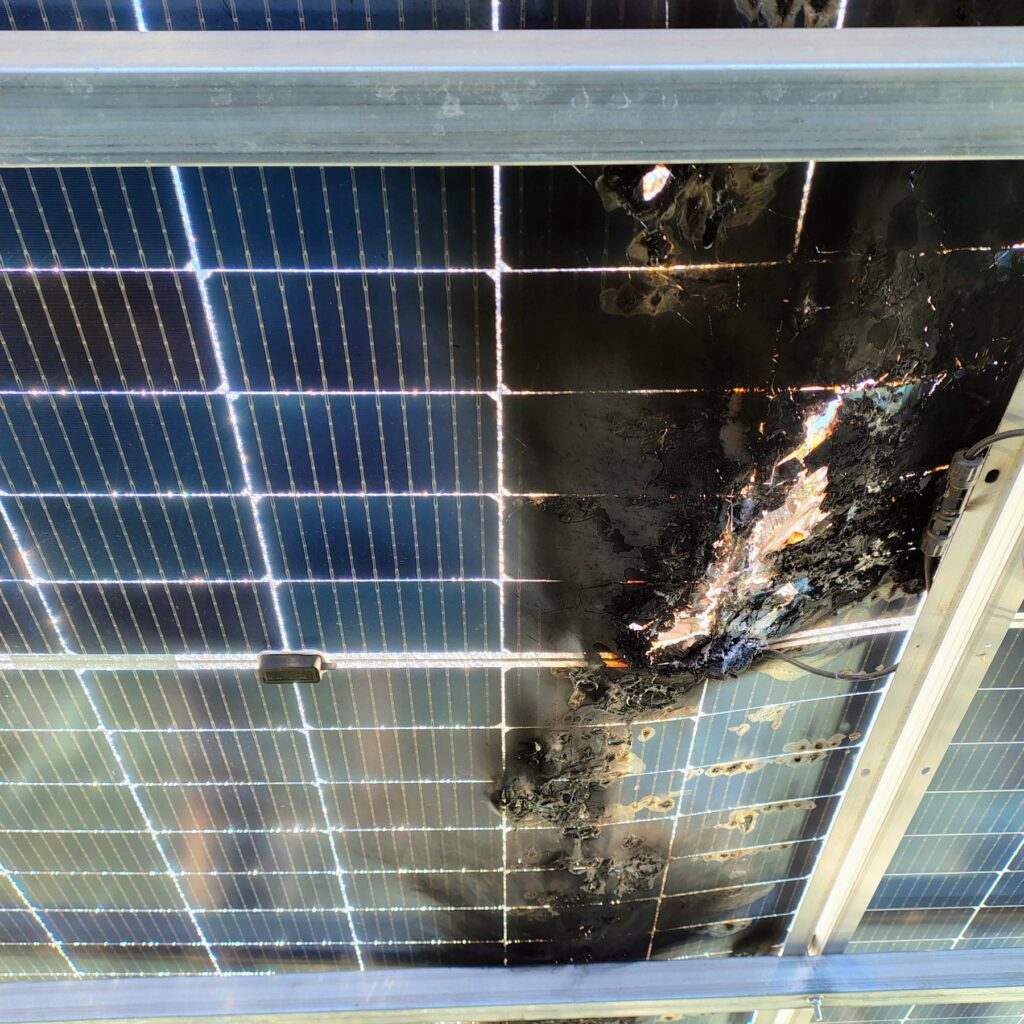
What Is a Solar Panel Hot Spot?
A hot spot occurs when one or more solar cells become significantly hotter than surrounding cells.
Under normal operating conditions, all cells in a solar module generate electricity and operate at similar temperatures.
When a cell becomes damaged, shaded, or electrically mismatched, it may begin consuming energy produced by neighboring cells instead of generating power.
As a result, the affected cell heats up rapidly and creates a localized high-temperature area known as a hot spot.
How a Hot Spot Develops
Typical failure sequence:
Healthy Cell
      ↓
Cell Damage or Shading
      ↓
Reduced Current Production
      ↓
Reverse Bias Condition
      ↓
Localized Heating
      ↓
Hot Spot Formation
      ↓
Cell Degradation
      ↓
Permanent Module Damage
Common Causes of Hot Spots
1. Partial Shading
Even small shadows can create significant cell stress.
Common sources include:
- Chimneys
- Antennas
- Tree branches
- Utility poles
- Bird droppings
- Leaves
- Dirt accumulation
Because solar cells are connected in series, shading one cell can affect the entire string.
2. Cell Microcracks
Microcracks are tiny fractures inside solar cells.
They may be caused by:
- Transportation damage
- Improper handling
- Mechanical stress
- Snow loads
- Strong wind loads
- Thermal expansion
Microcracks are often invisible to the naked eye but can significantly increase hot spot risk.
3. Manufacturing Defects
Factory defects occasionally lead to:
- Poor cell interconnections
- Defective solder joints
- Cell contamination
- Internal resistance variations
These defects can create uneven current flow and localized overheating.
4. Failed Bypass Diodes
Bypass diodes protect modules during shading conditions.
If a bypass diode fails:
- Current may flow through damaged cells
- Local temperatures can increase dramatically
- Module degradation accelerates
Bypass Diodes in Solar Panels – Functions, Symptoms and Common Failures
5. Potential Induced Degradation (PID)
PID can create leakage currents within the module.
Possible consequences include:
- Reduced power output
- Cell mismatch
- Increased operating temperature
- Hot spot development
Typical Hot Spot Temperatures
Under normal conditions, solar modules operate between 30°C and 60°C.
Hot spots can reach significantly higher temperatures.
| Condition | Typical Temperature |
|---|---|
| Normal module operation | 30°C – 60°C |
| Warm summer operation | 50°C – 75°C |
| Minor hot spot | 70°C – 90°C |
| Severe hot spot | 90°C – 120°C |
| Critical hot spot | Above 120°C |
Temperatures above 100°C can cause long-term damage to module materials.
Visible Signs of Hot Spot Damage
Installers may observe:
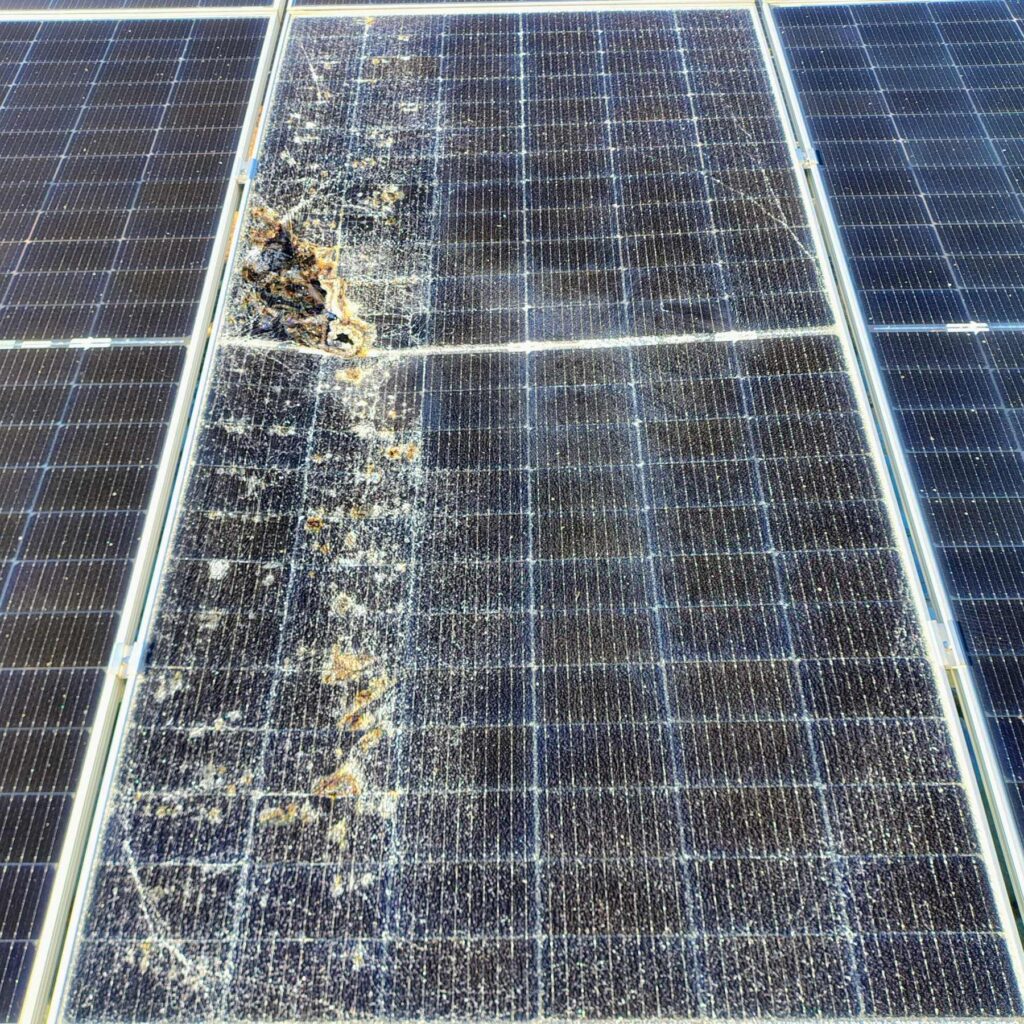
- Black spots on cells
- Brown discoloration
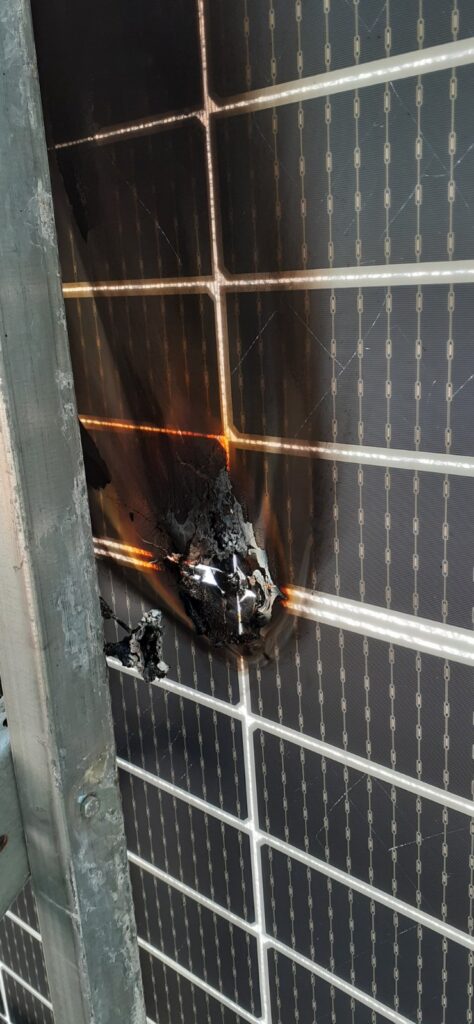
- Burn marks
- EVA yellowing
- Delamination
- Cracked cells
- Burned backsheet areas
- Melted junction boxes
Not all hot spots are visible during early stages.
Thermal imaging is often required for accurate diagnosis.
Detecting Hot Spots Using Thermal Imaging
Infrared thermography is one of the most effective diagnostic methods.
Example:
| Cell Condition | Temperature |
|---|---|
| Healthy cell | 42°C |
| Adjacent cells | 44°C |
| Hot spot cell | 95°C |
A temperature difference greater than 10°C–20°C between neighboring cells often indicates a developing problem.
Thermal Imaging Severity Assessment
Thermal imaging can help classify the seriousness of a hot spot.
| Temperature Difference Compared to Neighboring Cells | Assessment |
|---|---|
| Less than 5°C | Normal |
| 5°C – 10°C | Monitor condition |
| 10°C – 20°C | Possible hot spot |
| Greater than 20°C | Serious hot spot requiring investigation |
A large temperature difference is often a stronger indicator than the absolute temperature itself.
Power Loss Caused by Hot Spots
Hot spots do not only damage modules.
They also reduce system performance.
| Hot Spot Severity | Estimated Power Loss |
|---|---|
| Minor | 1% – 5% |
| Moderate | 5% – 15% |
| Severe | 15% – 40% |
| Critical | Above 40% |
Actual losses depend on module design and fault severity.
Can Hot Spots Cause Fires?
Yes.
Although most hot spots do not result in fire, severe overheating can damage insulation materials and create ignition risks.
Fire risk increases when combined with:
- Damaged backsheets
- Moisture ingress
- Defective connectors
- DC arc faults
- Poor installation practices
The probability remains relatively low, but hot spots should never be ignored.
Hot Spots vs Other Solar Panel Defects
| Defect | Main Symptom | Thermal Signature |
|---|---|---|
| Hot Spot | Local overheating | Very visible |
| PID | Gradual power loss | Usually uniform |
| Delamination | Bubble formation | Variable |
| Microcracks | Reduced output | May develop into hot spots |
| Failed Bypass Diode | Overheating section | Large hot area |
Correct diagnosis is important because corrective actions differ.
How to Diagnose a Hot Spot
Visual Inspection
Look for:
- Cell discoloration
- Burn marks
- Cracks
- Delamination
Thermal Imaging Survey
Infrared cameras quickly identify abnormal temperature patterns.
Thermography is considered the industry standard for hot spot detection.
IV Curve Testing
IV curve analysis can reveal:
- Cell mismatch
- Reduced module performance
- Internal module defects
Electroluminescence (EL) Testing
EL testing can detect:
- Microcracks
- Broken cells
- Hidden manufacturing defects
This method is commonly used by manufacturers and laboratory testing facilities.
Real-World Example
During a routine thermal inspection of a commercial rooftop PV installation, technicians identified a solar module operating at approximately 105°C while adjacent modules remained below 50°C.
Further investigation revealed severe cell microcracks likely caused during transportation.
The affected module was replaced, preventing further degradation and reducing the risk of future electrical faults.
Prevention Tips
To minimize hot spot formation:
- Avoid partial shading
- Use proper mounting methods
- Follow manufacturer handling procedures
- Perform regular thermal inspections
- Replace damaged modules promptly
- Verify bypass diode functionality
- Keep modules clean
Preventive maintenance is significantly less expensive than replacing damaged equipment after a failure occurs.
Conclusion
Hot spots are one of the most common causes of solar module degradation and can significantly reduce system performance if left untreated.
They are typically caused by shading, microcracks, manufacturing defects, bypass diode failures, or aging-related cell degradation.
Regular inspections, thermal imaging surveys, and prompt corrective actions can help prevent long-term damage, improve energy production, and reduce fire risk in solar PV installations.
Frequently Asked Questions
What causes hot spots in solar panels?
The most common causes are partial shading, cell microcracks, manufacturing defects, failed bypass diodes, and cell aging.
Are black spots on solar panels dangerous?
Not always, but black or burned areas may indicate overheating and should be inspected to prevent further damage.
Can a hot spot reduce solar panel output?
Yes. Depending on severity, hot spots can reduce module performance by several percent or significantly more in severe cases.
Can thermal imaging detect hot spots?
Yes. Infrared thermography is one of the most reliable methods for identifying hot spots and overheating cells.
Should a solar panel with a hot spot be replaced?
If the hot spot is severe or continues to worsen, module replacement is usually recommended to prevent further damage and maintain system performance.
Huawei Solar Troubleshooting Hub – Error Codes, Monitoring & Installation Issues
One Comment